


MoneyLion: Banking & Cash Back
4.541.92K Reviews
App Specs
- Version
- 7.158.0
- Updated On
- License
- Free
- Downloads
- 5,000,000+
- Developer
- MoneyLion Inc.
- Categories
- Finance
- Platform
- Android, iOS
Screenshots


 Analysis by AppCompare
I look at MoneyLion as a free starting point for bringing several money-related tasks into one app, not as a promise that every feature will suit every person. That distinction matters: a no-cost download can be useful, but borrowing, banking, investing and cash-back offers each deserve a separate look before you make decisions. I’d use it to explore those options and keep an eye on my finances, while checking the terms of any product I might actually use.
What “free” tells you—and what it doesn’t
MoneyLion is a free finance app from MoneyLion Inc., so there’s no purchase price just to get started. That makes it easy to try as a companion to the bank or budgeting tools you already use. Free access is a helpful entry point, but it isn’t the same as saying every financial service inside the app is cost-free. Before opening an account, borrowing, or investing, I’d read the terms shown for that specific option and decide whether its costs and conditions work for me.
The app has a 4.7 average from around 205,000 ratings, and it has been installed over five million times. Those figures suggest it has reached a large audience, but they don’t tell me whether a particular loan offer will fit my circumstances or whether a specific feature is available to me. I’d treat the popularity as context, not as a substitute for comparing the details that matter to my own finances.
One place to explore several money tasks
The practical appeal is the range of tools gathered under one roof: banking, cash back, credit-building options, personal-loan offers, cash advances and investing. I can see why that mix might be appealing if I’m tired of jumping between separate apps. The useful question is not whether one app can do everything, but whether the parts I need are clear and worthwhile enough to keep using.
For example, I might check cash-back offers while planning a purchase, then look at a credit-building option when reviewing longer-term goals. Keeping those activities together can make it easier to remember what I meant to follow up on. Still, I wouldn’t let the convenience of a single dashboard blur the difference between earning a reward, taking on debt and investing money; each has a different purpose and level of risk.
Where it fits beside a bank or budgeting app
Compared with using only a traditional bank app, MoneyLion can bring more than day-to-day account activity into view, particularly offers and credit-related tools. Compared with a dedicated budgeting app, its emphasis is less about building a detailed spending plan and more about giving access to a mix of financial services. That makes it potentially useful as a second app, even if it doesn’t replace the one I rely on for a precise household budget or my main banking relationship.
I’d also avoid opening or moving accounts simply because an app presents multiple options together. If I already have a bank whose features and service work well for me, I can keep it and use MoneyLion only for the tools that add something specific. A focused setup is often easier to understand than trying to consolidate every financial decision into one place.
Worth Reading Before You Choose

EA SPORTS FC Mobile 26 Is a Bigger Football Game, but It Takes Time

Flipboard Shows What News Apps Must Do Beyond the Feed

Switching to Android Auto Means Rethinking Your Driving Routine

Google Calendar Makes a Crowded Week Easier to Manage

Ludo King Makes the Most of the Minutes Between Plans

Baby Panda World Brings Quick Play to Modern Phones, but Its Game Library Feels Busy
A few practical checks before acting
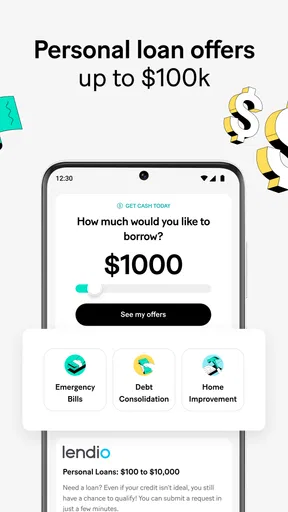
When evaluating any cash advance or personal-loan offer, I’d compare the amount, repayment schedule, total cost and eligibility requirements with alternatives I already have. An advance can address a timing gap, but it doesn’t solve a recurring shortfall; if I need one often, I’d first look at the pattern behind the expense. The same care applies to credit-building products: I’d confirm how repayment works and what happens if a payment is late before relying on one to support my credit history.
For cash back, I’d check whether an offer applies to a purchase I already planned, and I’d note any conditions before buying. A reward is only worthwhile if it doesn’t nudge me into spending more than I otherwise would. For investing, I’d decide what the money is for and how much fluctuation I can tolerate before choosing an option. Beginner-friendly explanations can help me understand a product, but they don’t remove investment risk.
Who is likely to get the most from it?
I can see this being a good fit for someone who wants to explore several financial tools from one account and is willing to compare terms rather than tap through on impulse. It may also suit a person who wants to browse cash-back offers alongside banking or credit-related features, especially if using a separate service for each task feels cumbersome.
It’s less compelling if I only need a simple checking account, a carefully structured budget, or a single-purpose investment platform. In those cases, a provider focused on that one job may be easier to evaluate and may fit my routine better. I’d also skip any borrowing feature that doesn’t match my repayment capacity, regardless of how convenient it looks in the app.
Day-to-day use is about keeping decisions separate
Imagine I’m reviewing my spending after a routine grocery run and see a cash-back offer for a shop I already use. I can check its conditions before my next planned visit, then treat the reward as a small extra rather than a reason to add items to my basket. Later, if an unexpected bill leaves my account short before payday, I can examine any cash-advance option—but I’d compare its terms and consider whether adjusting my budget or asking the biller about timing would be a better answer.
That sequence is where I think a multi-tool app can help: it puts useful choices close at hand, while leaving the decision to me. My tip is to review one feature at a time and keep notes on what you’ve accepted, what still needs attention and which offers you decided against. That small habit can prevent a convenient home screen from turning into a jumble of half-finished financial decisions.
The app is rated for Everyone and is free to install. It was released on May 19, 2016, and version 7.141.0 requires Android 7.0 or later. I’d still check that my device and the particular financial products I want to use are supported before building a routine around them.
What's the Buzz About?
This app is not just your typical banking app. MoneyLion: Banking & Cash Back offers a unique blend of financial tools, including checking accounts, credit-building loans, and investment opportunities. Plus, you can earn cash back on your purchases, which is always a nice bonus!
Getting Started
Setting up my account was a breeze. After downloading it from the app store, I spent about five minutes entering my details and verifying my identity. The interface is super clean and intuitive, which makes navigation a piece of cake. You can easily toggle between different features like banking, loans, and investments without getting lost.
The Banking Experience
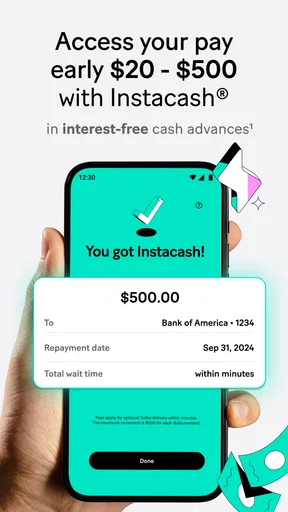
The checking account comes with no hidden fees, which is a huge relief. I’ve had my fair share of surprise charges in the past, and knowing I won't encounter any here is comforting. Also, they offer early paycheck access, so if you're like me and sometimes need that cash a little sooner, this feature is a game-changer.
Cash Back Rewards
Who doesn't love cash back? Every time I shop at participating stores, I rack up rewards. It’s pretty satisfying to see that cash back piling up. The app even sends notifications to remind me of ongoing deals. It’s like having a personal shopper who’s got your back, quite literally.
Building Credit
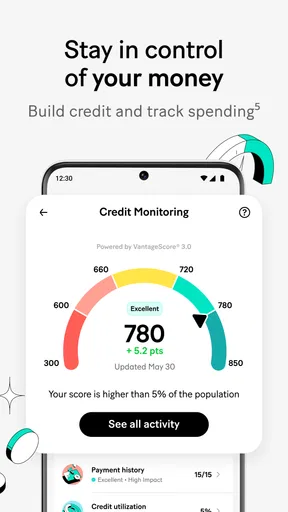
I’ve been trying to boost my credit score, and the app’s credit builder loan is a nifty feature. It lets you borrow a small amount to repay over time, and they report your payments to credit bureaus. It’s a simple way to give your credit score a nudge without taking on too much risk.
Investment Opportunities
If you’re keen on dipping your toes into the investment world, MoneyLion has options for you. I’m no financial guru, but the app’s guided investing feature makes it easy to start investing with just a few bucks. It breaks down complex concepts into digestible info, which is great for newbies like me.
Final Thoughts
Overall, MoneyLion: Banking & Cash Back is a robust app for anyone looking to manage their finances more effectively. Whether you’re in it for the banking, the cash back, or the credit-building features, there's something for everyone. It’s like having a financial advisor, bank, and rewards program all rolled into one. Give it a shot, and you might just find it’s the financial tool you’ve been waiting for!
Pros
- User-friendly interface simplifies navigation.
- Cashback rewards on everyday purchases.
- Offers free credit score monitoring.
- No hidden fees in banking services.
- 24/7 customer support available.
Cons
- Limited investment options available.
- Cashback capped on certain transactions.
- Requires stable internet for best use.
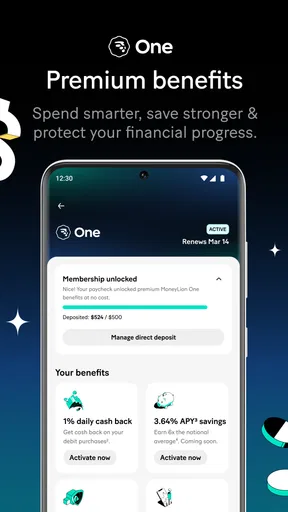
- Some features locked for premium users.
- Occasional app performance lags.
FAQs for MoneyLion: Banking & Cash Back
What features does MoneyLion offer?
MoneyLion provides a comprehensive suite of financial tools, including mobile banking, cash advances, and investment options. Users can also access credit builder loans and cashback rewards through their app. Additionally, MoneyLion offers personalized financial advice to help users manage their finances effectively.
Is MoneyLion safe to use?
Yes, MoneyLion is designed with security in mind. It uses advanced encryption and security measures to protect user data. The app is FDIC insured, which means your funds are protected up to the insured limit. Always ensure you download the app from official app stores to avoid security risks.
How does the cashback feature work?
MoneyLion offers cashback rewards on everyday purchases through their app. By linking your debit card, you can earn cashback at participating retailers. The cashback varies by store and is deposited directly into your MoneyLion account, allowing you to save or invest your rewards.
Are there any fees associated with MoneyLion?
While MoneyLion offers many free features, certain services may incur fees. For example, instant cash advances or premium membership options might come with a charge. It's essential to review their terms and conditions to understand any potential fees before using specific features of the app.
Can I access MoneyLion customer support easily?
Yes, MoneyLion provides multiple ways to access customer support. Users can reach out through the in-app chat, email support, or by calling the customer service hotline. The app also offers a comprehensive FAQ section to help users find quick answers to common questions.


